Bulk Image Press
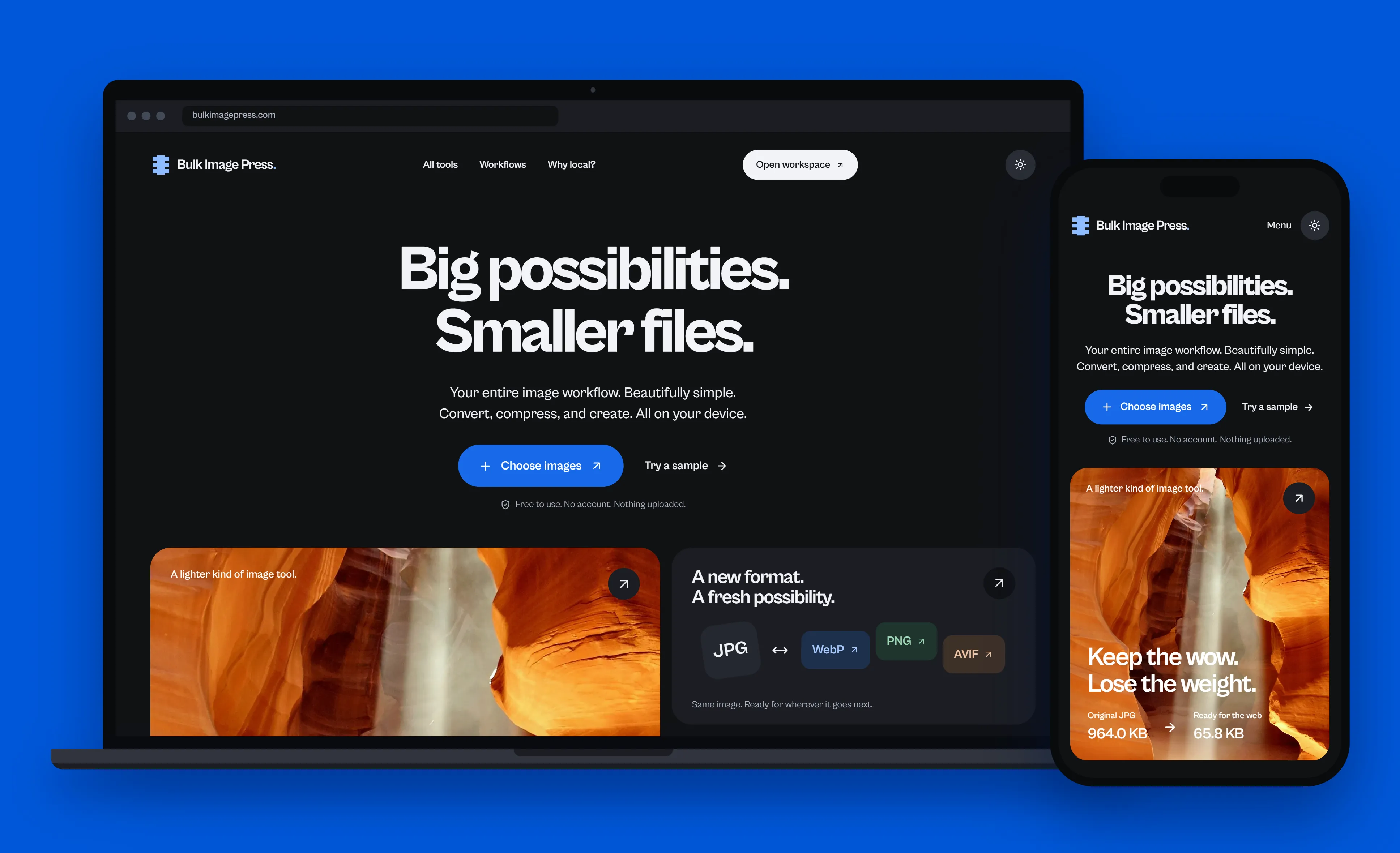
A free image tool that converts and compresses files right in the browser, with nothing uploaded.
- My role
- Product plan, design, development and SEO
- Stack
- Astro, React, TypeScript and WebAssembly codecs
- Hosting
- Cloudflare Pages, static, no server functions
- Launched
- 30 October 2026 at bulkimagepress.com
- Size
- 112 tools in 11 categories, 133 pages
- Language
- English
- 112free tools, each on its own page
- 131indexable URLs in the sitemap
- 0images uploaded, every file stays on the device
- 42automated checks passed at launch (16 unit, 26 browser)
The brief
Bulk Image Press is a free image workspace that runs in the browser. You choose a batch of photos, convert, compress, resize or edit them, and download the results. The files never leave your device. There is no account, no watermark and no upload.
I took it from the first product decision to launch: what it should do, how it should look, how it should be built, and how people should find it on Google and Bing.
Who it’s for
- People with iPhone photos who need a folder of HEIC files that works everywhere.
- Website owners who want smaller images without visible damage.
- Sellers who need consistent product photos.
- Designers and social teams who need several sizes and animated assets.
- Anyone who must meet a form’s size or byte limit.
- Anyone who would rather not send personal photos to a server.
The challenge
Four problems shaped everything else.
- A big catalogue. The tool had to cover 112 jobs, from HEIC conversion to GIF editing and EXIF cleaning, without turning into 112 thin, near-identical pages.
- Privacy and running cost. Processing had to happen on the visitor’s device, so there is nothing to upload and no server bill that grows with use.
- Feel. A utility should feel as precise as a product launch, not like a pile of converters.
- Being found. People search for tasks (“HEIC to JPG”), so every tool needed to be a page that can be found.
Design
The idea
The name gave me the idea. A press takes a loose stack of originals and turns them into a precise, ordered sheet. The design carries that thought through: a batch comes in, one operation is applied, the results line up. The homepage then proves it with something real: a before-and-after comparison that is encoded live in the browser, with the actual file sizes beside it.
Look and feel
- Type. Cabinet Grotesk, self-hosted, tightly tracked.
- Colour. A paper-white ground (
#F5F5F7), near-black ink (#171719) and one accent, cobalt (#0057D9), used for the main action and selected values. A neutral black (#101012) carries the dark showcase sections. - Shape. An asymmetric bento grid: large tiles for real photographs and working demos, small tiles for a concrete job, format or measured result. One deliberate 28px radius, flat fills, no resting shadows, no glass, no decorative gradients.
- Light and dark. A theme button on every page. It follows the system setting until you choose, remembers the choice, and still works when the browser blocks storage.
The homepage argument
Every section exists to prove one claim, in this order:
- Hero: this is a free image tool you can start using immediately. The first action is Choose images.
- Live comparison: you can check the quality before you commit.
- Tool bento: it finishes real jobs beyond format conversion.
- Workflow: your images stay in one session across steps.
- Catalogue: every tool can be found, with search.
- Privacy and limits: what stays local, and what doesn’t.
- FAQ: the common worries, answered.
There is no logo wall, no testimonial row, no “millions processed” and no pricing tiers. I didn’t have those, so the page doesn’t pretend to. Photographs are real, credited public-domain or CC0 images, so visitors compare real detail, transparency and screenshot text.
The workspace
The workspace answers one question: what will happen to this batch, and is it ready to download? On desktop, your image list sits on the left, the image and its preview in the centre, and the settings on the right under “Make it yours”. On a phone it becomes separate views for Images, Settings and Preview, over one shared session. Output sizes are the real encoded sizes, and errors are shown per file, so one bad image never blocks the rest.
Motion
My rule was that motion explains the product on the homepage and stays out of the way where people work. Animation uses transform and opacity only, repeated work in the editor is immediate, and reduced-motion settings get a static composition. No preloader, no cursor follower and no scroll hijacking.
Accessibility
The comparison table uses check, cross and dash symbols with screen-reader labels and a short legend, and has a compact five-column layout on phones. Controls are labelled, and the interface follows the system’s reduced-motion setting.
Build
Stack. Astro pre-renders every page as static HTML, so search engines get real content and pages load fast. One React island holds the workspace, because only that part needs client state and workers. TypeScript throughout. There is no database, no server queue and no API key.
How a file is processed. Everything happens in the browser:
file, check, decode in a worker, apply the operations, encode once, measure the real output, download
Edits are applied together and encoded once, so chaining crop, resize and adjust steps doesn’t lose quality again at every step.
What’s inside
- WebAssembly codecs for JPEG, PNG, WebP and AVIF, plus HEIC decoding.
- Target-byte compression, which fails clearly when a size target is impossible, instead of pretending.
- A GIF suite: frame editing, speed, reverse, crop, sprite sheets and APNG export, with local FFmpeg for specialist formats.
- A JPEG EXIF editor with seven editable fields, GPS removal, a metadata inspector and a downloadable JSON report. Pixels are not re-encoded.
- Optional local AI (portrait background removal and upscaling). The model downloads only if you opt in, and your images are never sent to it.
- Batch queue with cancellation, tool chaining and individual or ZIP downloads.
- A service worker so the core tools keep working offline.
One catalogue, one source of truth. A single registry file defines all 112 tools. It generates the navigation, the routes, the counts, the related-tool links, the breadcrumbs and the sitemap. Presets share engines: “compress to 100 KB” and “compress to 200 KB” are one engine with different limits, so nothing is built twice.
Hosting and the 25 MiB problem. I chose Cloudflare Pages for free, unlimited static requests, so the site costs nothing extra as it grows. Two WebAssembly files were over Cloudflare’s 25 MiB limit. A build step now packs them as gzip and checks a byte-for-byte round trip before removing the originals. The video engine went from 30.74 to 9.78 MiB and the AI runtime from 25.62 to 6.32 MiB, with no object storage or server added.
Privacy and security. No media upload path exists. No third-party analytics were added at launch. The host sends a strict Content Security Policy, blocks MIME sniffing, sets the referrer policy, and disables camera, microphone and location. Fonts, codecs and models are self-hosted.
SEO optimization
This is the part I treated as a product feature, not an afterthought. A 112-tool catalogue only works if each tool can be found.
Structure
- 133 pre-rendered pages, 131 of them indexable. Each of the 112 tools has its own URL under its category, plus category pages, the directory, help, formats, privacy, terms and licences.
- Noindex where it should be. The working
/apppage and the error page are noindex, androbots.txtlets crawlers see that instruction. Workspace sessions are never indexed. - Clean URLs. Flat HTML output means extensionless canonical URLs are served directly, and an unknown URL returns a real 404 page.
- Internal links. All 11,659 rendered internal links are checked against the build, and the footer links every category and the full directory.
On every tool page
- A unique title and meta description, a canonical URL and exactly one h1. Titles use descriptive, “Bulk”-prefixed names rather than generic ones.
- The real, configured tool near the top of the page, so the page answers the search straight away.
- Original task copy, instructions, a genuine example, format caveats, an FAQ and related tools. I avoided 112 paragraphs that only swap a keyword.
- A task profile that sets the right controls and defaults for each page: fixed converters lock the output format, metadata viewers drop quality sliders, social tools offer editable size presets.
Structured data
- Organization, WebSite, WebPage and ImageObject on the homepage.
- On tool pages: a free WebApplication, an FAQPage that matches the visible answers, and a BreadcrumbList.
- Category and directory pages describe their real tool lists.
- No ratings, testimonials, review counts or invented dates. FAQ markup makes no promise of rich results or rankings.
Social cards, sitemap and engines
- A 1200 × 630 image for every page, generated by a script, with matching Open Graph and Twitter tags and image alt text.
- A sitemap of the 131 canonical URLs, with no made-up last-modified dates, and a
robots.txtthat points to it. - Bing: the Bing Webmaster verification file is served from the site root. Google Search Console verification is supported through an environment value, so the same build works for staging and production.
What I left out on purpose
- No keyword stuffing. The brief asked for meta keyword tags, so they are there, but Google ignores them. The ranking work is in titles, useful task content, crawlable links and accurate structured data.
- No competitor claims. The homepage compares categories of tools, names no competitors and claims no speed or quality wins I haven’t measured.
- Only finished tools are indexed. A route that isn’t ready stays out of the sitemap.
The SEO check
I wrote a preflight script (npm run test:seo) that fails the build if anything slips. It checks every HTML page for unique titles and descriptions, canonical and social URLs, local image files, valid JSON-LD, a single h1, robots and sitemap consistency, working internal links and the host’s asset size limit.
Testing
At launch, 16 unit tests and 26 browser tests passed, along with the TypeScript check, the full 133-page build and the SEO preflight. The browser tests run against the live site and check real downloaded files, not success messages: actual bytes and containers, dimensions, transparent pixels, ZIP contents, GIF frame timing, EXIF changes, offline conversion, model opt-in and a 112-page SEO crawl. The homepage and a tool page also passed a design inspection at desktop, tablet and phone widths with zero failures.
What it doesn’t do, and says so
Each limit is written on the page it affects and on the Formats page.
- No generative inpainting. Object removal fills from the edges or covers a region.
- Background removal is trained for portraits, not any product.
- Automatic face blur handles one face and depends on the browser’s FaceDetector. Manual redaction is the alternative.
- EXIF writing covers seven documented JPEG fields, not every tag.
- Live Photo exports are files for a companion app, not paired Photos assets.
- A broader audit on real iPhones and Safari is still to come.
Where it stands
Bulk Image Press launched on 30 October 2026 and is live at bulkimagepress.com. It is new, so I have no traffic or ranking figures to show yet, and I’d rather leave them out than invent them. Next: submit the sitemap in Google Search Console and Bing Webmaster Tools, then watch indexing and Core Web Vitals.